
Welcome to our blog
Drone Terrorism?

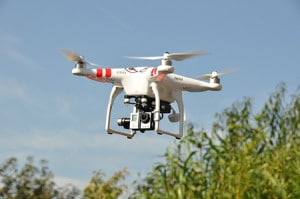 Drones are a popular topic in the news today. More and more, drones are being used by people in cities and rural areas across the country. On October 23, 2016, Law enforcement officials fired at an unmanned aircraft and a large group of opponents of the Dakota Access pipeline blocked a North Dakota state highway Sunday, capping a weekend of protests.
A helicopter helping monitor a protest against the four-state pipeline Sunday morning was approached by a drone in a “threatening manner,” the Morton County Sheriff’s Office said in a statement. An officer in the helicopter told law enforcement on the ground that the pilot and passengers were “in fear of their lives” and that the unmanned aircraft was going after them. Less-than-lethal ammunition damaged the drone, which was then landed by its operator.
Morton County Sheriff Kyle Kirchmeier said drones flying near protests and near the area where hundreds have been camping out are not being operated according to federal regulations.
“Reports of drones not being operated within the (Federal Aviation Administration) guidelines or in a reckless and unsafe manner are being investigated and forwarded to the Morton County States Attorney’s office for prosecution,” Kirchmeier said in a statement. Two people operating drones during the protests have already been charged.
Sunday afternoon, the large group of protesters had blocked the highway with hay bales, rocks, tree stumps and other items to create a roadblock north of the encampments, to where at times thousands of people have flocked. The North Dakota Department of Transportation closed the highway down.
Texas-based Energy Transfer Partners is building the $3.8 billion pipeline, which crosses through North Dakota, South Dakota, Iowa and Illinois. Opponents worry about potential effects on drinking water on the reservation and farther downstream because the pipeline will cross the Missouri River, as well as destruction of cultural artifacts.
Sunday’s demonstrations come after more than 80 people were arrested Saturday during a large protest at a pipeline construction site. More than 220 people have now been arrested since demonstrations began in August.
Source: http://www.ocregister.com/articles/pipeline-733083-dakota-people.html
Now a solution to bring that intrusive drone down
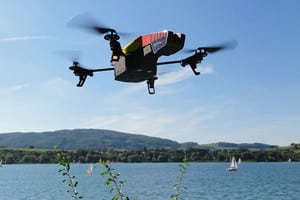 Dones are increasing in numbers every day. While this is good news for the drone industry, it causes significant concerns to several agencies that need to protect their resources. Locations like prisons, for instance, require their airspaces to be free of drones to prevent any sort of malpractice.
Authorities around the world have tried different measures for this. The Dutch police, for instance, has trained eagles to tackle intrusive drones. Other measures include shooting a net to capture the drone, or even the conventional firearms to shoot the drone down.
However, none of these measures are perfect. Using eagles is not agreeable to animal rights activists, nets are not viable in the long distance and firearms come with their own challenges.
Now, a Taiwanese startup has come up with a solution that can bring a drone down or send it back to its spot of origin. DronesVision’s HiGH + MiGHTY SKYNET looks like an oversized rifle with a viewfinder and a trigger to activate it. It is light at 5.7kg and works on lithium ion battery that has to be carried separately in a backpack.
How does it work?
Consumer drones mainly use two bands in while in operation. One is the GPS/GLONASS for satellite position at 1.45-1.65GHz and the other is the remote control uplink and video transmission downlink, both of which use 2.4 GHz band.
“Our product HiGH + MiGHTY SKYNET anti-drone system is designed to jam/block these two bands when drones are flying into unauthorized areas,” said Kason Shih, Founder and CEO of DronesVision. “HiGH + MiGHTY SKYNET can block GPS navigation positioning, force rogue drones fly back to original take-off points, or to land onto the ground where they hovered.”
The solution can work in three modes. In the first mode, it can cut off the global positioning system alone, causing the drone to drift in the air, making it harder to control. Usually, when this happens, the owner gets nervous and stops flying around. In the second mode it can jam the remote transmission link, cutting off the video connectivity, and it will send the drone back to its owner, allowing authorities to track down the culprit. In the third mode, the solution can force the drone to land on the spot where it hovered and got jammed, enabling authorities to access the footages it has recorded.
The target market
SKYNET can be useful in a range of situations, but currently, the company is targeting government, critical infrastructure and other large-scale deployments. It sells mainly to systems integrators and arms dealers.
“At the moment, our target customers are government-related units such as military, police and law enforcement, fire department, power plants, prisons, airports,” Shih said. “In the near future, it might be deployed to protect stadiums or sports events, amusement parks, national parks.
Outlook
The drone market is expected to witness significant growth in the coming years. According to a report from MarketsandMarkets, the global UAV market for commercial application is expected to reach US$5.59 billion by 2020, growing at a CAGR of 32.22 percent between 2015 and 2020.
With such growth, the concerns associated with it could also increase, and hence there could be a strong market for a solution like SKYNET in the coming years. DronesVision is looking to capitalize on this and is currently working on a second solution called Dronedar that would integrate a radar-based drone detection system with the anti-drone facility.
This article originally appeared on August 23, 2016 on www.asmag.com, written by Prasanth Aby Thomas.
Source: http://www.asmag.com/showpost/21033.aspx
What are the differences between the 1080p version and the 720p version of the same media?
Differences in video probably won’t be noticeable for untrained eye. 1080p video would have to be downscaled anyway.
Let’s assume the original video was 1080p. In this case the 720p video was first scaled, then compressed. On the other hand, 1080p clip was first compressed server-side, then scaled on your machine. 1080p file will obviously be bigger. (otherwise it would offer higher resolution, but at lower quality, ruining the visual experience and invalidating the point of using higher resolution1)
Lossy compression usually causes visual artifacts that appear as square blocks with noticeable edges when video is paused, but aren’t visible when you play it with normal framerate. 1080p file will contain more square blocks (caused by compression) than 720p video, but those blocks will be of approximately the same size in both videos.
Doing simple math we can calculate that 1080p video will contain 2,25 times more such blocks, so after scaling it down to 720p those blocks will be 2.25 times smaller than in actual 720p video. The smaller those blocks are, the better quality of the final video is, so 1080p video will look better than 720p video, even on 720p screen. Resized 1080p video will appear slightly sharper than actual 720 clip.
Things get a bit more complicated if source material was bigger than 1080p. The 1080p clip is first scaled to 1080p and compressed before you play it and then scaled once again while playing. The 720p clip is scaled only once and then compressed. The intermediate scaling step which is present in 1080p video case will make its quality slightly worse. The compression will make 720p even worse, though, so 1080p wins anyway.
Audio
It’s not only video that is compressed, but audio too. When people decide to use higher bitrate for video compression, they often do the same with audio. 1080p version of the same video may offer better sound quality than 720p video.
Do you have questions about video and recording? Ask the Doctor! We will answer all your questions on our blog. Submit your questions today…